Summary
After installing Worry-Free Business Security (WFBS), you cannot send one-time and scheduled reports using the Exchange 2007 or 2010 as the SMTP server.
When you check the Ofcdebug.log, it shows that a report is successfully generated:
[rptman_Notification.cpp(143)]2012 05/23 11:51:19 [3990 : 3e84] (00) (E) [CMDHPMC][ofcservice.exe][ReportManager::ReplaceServerNameToken] truncate occured. szSubject:[[Security Server - GLOBAL-DC]Security Server Report] - [rptman_Notification.cpp(82)]
2012 05/23 11:51:19 [3990 : 3e84] (00) (D) [CMDHPMC][ofcservice.exe]_INI_SMTP_AUTH_ID=[] - [rptman_Notification.cpp(193)]
2012 05/23 11:51:19 [3990 : 3e84] (00) (D) [CMDHPMC][ofcservice.exe]_INI_SMTP_AUTH_PW=[***] - [rptman_Notification.cpp(196)]
2012 05/23 11:51:19 [3990 : 3e84] (00) (D) [CMDHPMC][ofcservice.exe]_INI_SMTP_AUTH_METHOD=[0] - [rptman_Notification.cpp(199)]
2012 05/23 11:51:24 [3990 : 3e84] (00) (W) [CMDHPMC][ofcservice.exe][ReportManager::NotifyByEmail] HOST:exchange.criso.com,PORT:25,TO:administrator@criso.com,Err:-4000029 - [rptman_Notification.cpp(219)]
2012 05/23 11:51:24 [3990 : 3e84] (00) (W) [CMDHPMC][ofcservice.exe][ReportManager::NotifyByEmail] zMailBody:A new report was generated at 5/23/2012 11:51:19.
However, the following error appears when running a packet capture while sending the report:
530 5.7.1 Client was not authenticated

Click image to enlarge.
This issue happens because, by default, the Exchange 2007 or 2010 only accepts secured and authenticated connections. In this case, WFBS tries to connect to the SMTP server even without any authentication. This causes the said server to respond with "530 5.7.1 Client was not authenticated".
To resolve the issue:
- Open the Exchange Management Console.
- Go to Server Configuration > Hub Transport.
- Click New Receive Connector on the right pane.
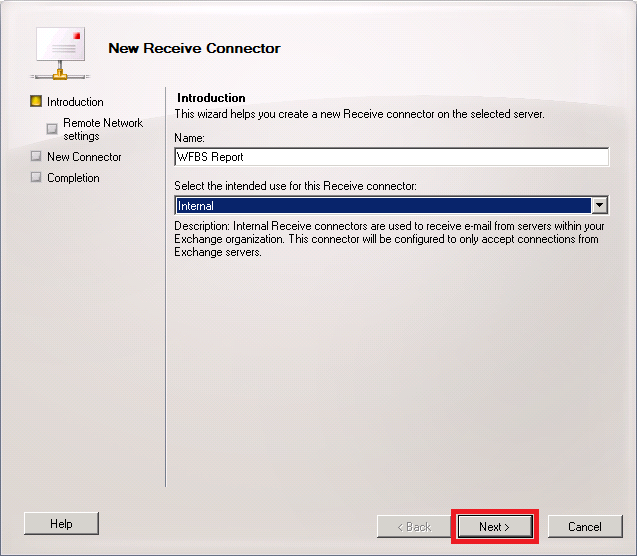
- Enter a name for the connector (e.g. WFBS Report / OSCE Report).
- Select Internal under the Select the intended use for this Receive connector section, and then click Next.
Click image to enlarge.
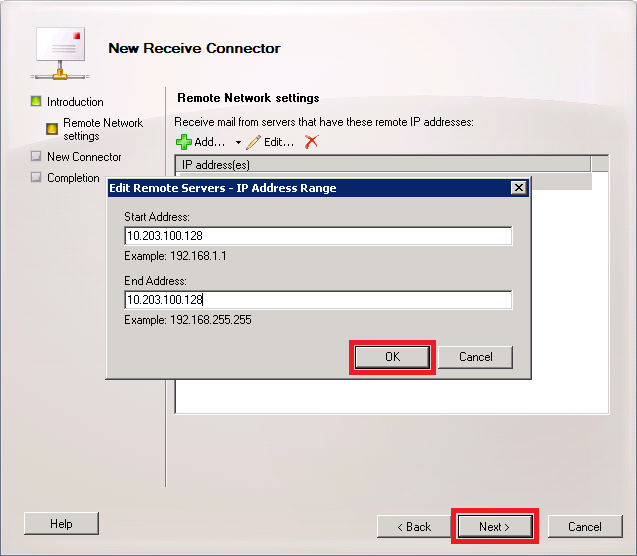
- Click Edit to set the IP address(es) that Exchange will accept connections from.
- Enter the Security Server IP address on the Start Address and End Address fields. This allows only the Security Server to use this connector.
Click image to enlarge.
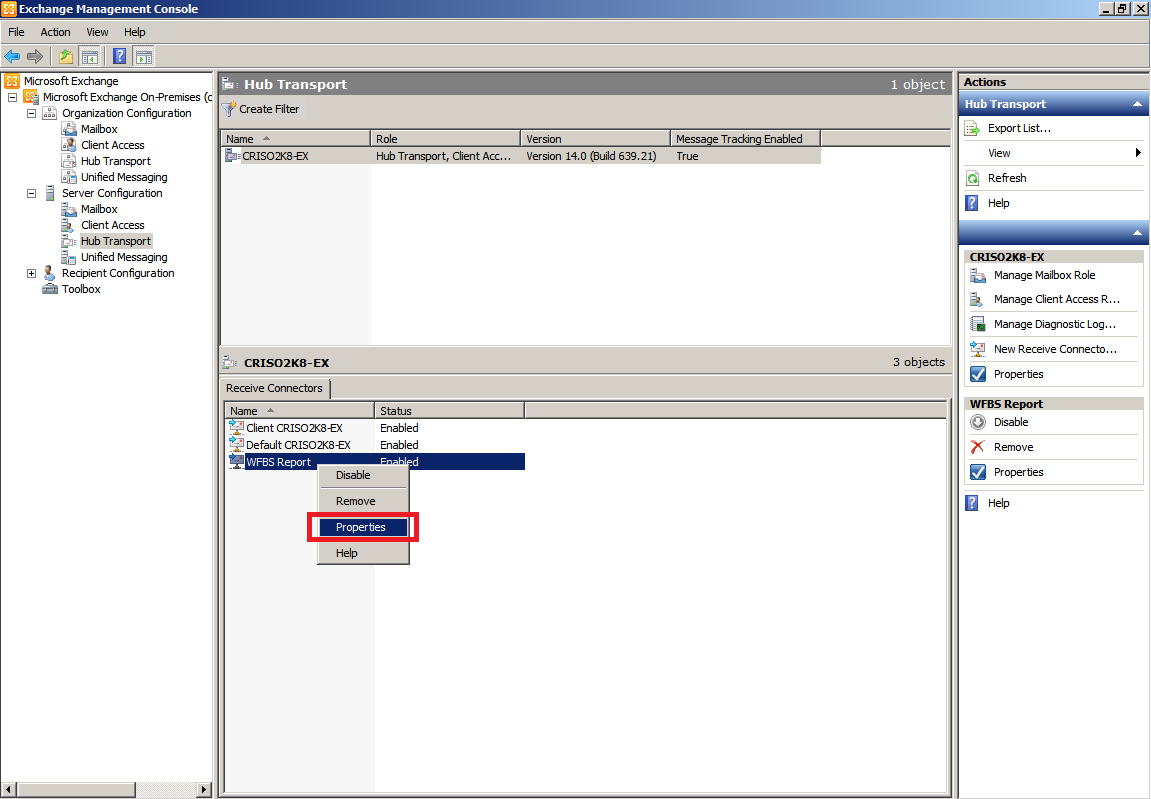
- Click Next, and then click Finish. The new receive connector should appear under the Server Configuration > Hub Transport.
- Right-click the new receive connector and click Properties.
Click image to enlarge.
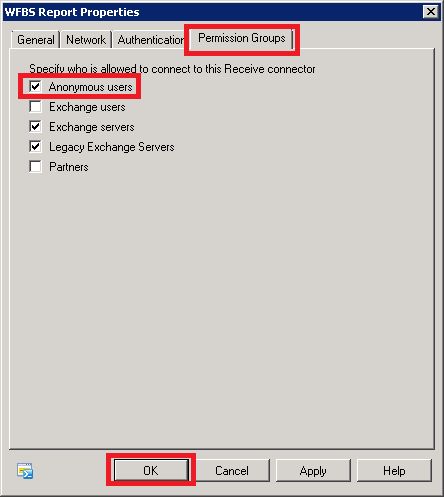
- Go to the Permissions Groups tab and tick Anonymous users check box.
- Click Apply and click OK.