Summary
When the OSCE server is located in an isolated network enviroment, the DLP agent is unable to deploy to agents. In the filelist, there is no DLP package or DLP SDK DLL in the DLPlite folder on the client's side. Upon checking tmudmp.txt, it shows the following:
Inf 20151130 10:03:24 3420 1836 The origin version[1.0] of item [1][524][L1][P1] is not between [0.0] to [0.
0], not possible to upgrade
Inf 20151130 10:03:24 3420 1836 Can not find item[1][524][L1][P1] info can not find
Inf 20151130 10:03:24 3420 1836 No need to update.
Inf 20151130 10:03:24 3420 1836 The origin version[1.0] of item [1][525][L1][P1] is not between [0.0] to [0.
0], not possible to upgrade
Inf 20151130 10:03:24 3420 1836 Can not find item[1][525][L1][P1] info can not find
Inf 20151130 10:03:24 3420 1836 No need to update.
Inf 20151130 10:03:24 3420 1836 The origin version[1.0] of item [1][526][L1][P1] is not between [0.0] to [0.
0], not possible to upgrade
Inf 20151130 10:03:24 3420 1836 Can not find item[1][526][L1][P1] info can not find
Inf 20151130 10:03:24 3420 1836 No need to update.
524, 525, and 526 are DLP-related Active Update Identifiers (AUIDs). Since the customer is in an isolated network, the OSCE server is unable to get them from Trend Micro Active Update (TMAU). Above, it shows that 524, 525, and 526 cannot be found and there is no need to update them.
To resolve the deployment issue:
- Find a working OSCE server with DLP installed.
- Go to ...\OfficeScan\PCCSRV\Download\server.ini.
- Open the server.ini file.
- Copy and paste the sections for 524 and 525 from the opened server.ini to the problematic OSCE server's server.ini.
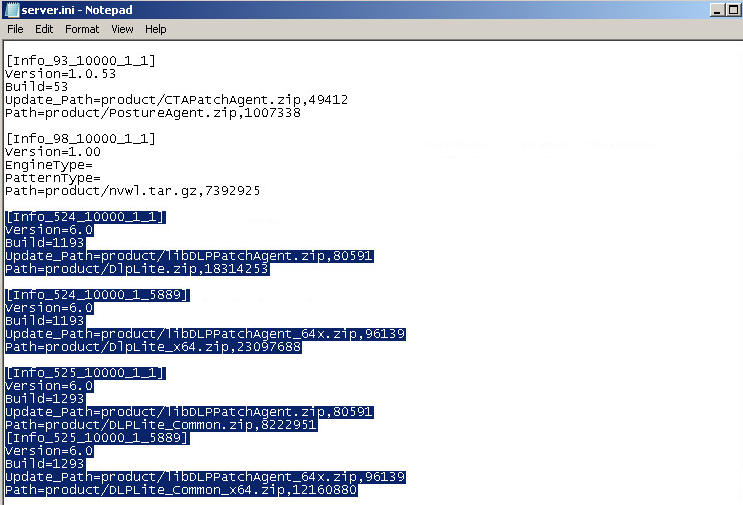
- Go to the ...\OfficeScan\PCCSRV\Download\product directory.
- Copy the following gzip files from the source server to the destination server:
- libDLPPatchAgent.zip
- DLPlite.zip
- libDLPPatchAgent_64.zip
- DLPlite_x64.zip
- DLPLite_common.zip
- DLPLite_common_x64.zip
- Re-deploy DLP.
DLP deployment should proceed without issue.


